
Best AI Product Recommendation Plugin for WooCommerce

Looking for the best AI product recommendation plugin for WooCommerce? Learn how AI recommendations work, compare top plugins, and set up personalized product suggestions step-by-step.

MD Zannatun Nime
AI product recommendations can help WooCommerce stores show products that are more useful and relevant to each shopper. Instead of showing the same related products to everyone, a recommendation system can use product information, customer actions, sales data, and product relationships to decide what products should appear next.
But AI alone is not enough. Store owners still need control over where recommendations appear, which products can be shown, how products are sorted, and how each recommendation looks.
In this guide, we’ll explain how AI product recommendations work in WooCommerce, what features you should look for and manage product recommendations with AI and rule-based controls.
What Is Product Recommendation in WooCommerce?
Product recommendations are product suggestions shown to customers while they shop in your WooCommerce store.
You may have already seen recommendation sections such as:
- You May Also Like
- Frequently Bought Together
- Related Products
- Recommended for You
- Best Sellers
- New Arrivals
- On Sale Products
- Complete Your Order
The main purpose is to help customers find products that match what they are already looking at, buying, or interested in.
For example, imagine a customer is viewing a laptop. Instead of showing random products, the store could recommend a laptop bag, wireless mouse, keyboard, or other useful accessories.
Recommendations can also appear at different parts of the shopping journey. You can show one recommendation on the product page, another in the cart, another during checkout, and even another after the order is completed.
A more advanced system can use different signals together. It may check the current product category, customer browsing history, stock status, sales performance, or previous purchases before deciding what to show.
This gives store owners more control and can make recommendations more useful for customers.
Can You Use AI to Recommend Products in WooCommerce?
Yes. AI can make the process of creating product recommendations much easier.
Normally, a store owner may need to select filters, choose sorting rules, set a placement, and configure other options manually.
With AI, you can describe what you want in normal language.
For example:
Create a best seller recommendation from the last 30 days and show it after add to cart.
An AI-based recommendation builder can understand that request and create the required settings for you.
You could also ask:
Recommend products customers recently viewed and show the highest-rated products first.
The AI can turn that instruction into filters and sorting rules. This saves time, especially when you are not sure which settings you need.
However, AI should not completely control the recommendation system. You should still be able to review the result, change the filters, adjust the sorting, choose a different placement, and edit the design.
WowRecommend uses this type of approach. AI can help create the recommendation, but the full setup remains available for manual editing.
Choosing the Right AI Product Recommendation Plugin
When choosing an AI product recommendation plugin, do not look only at whether it has AI. A useful recommendation plugin should also give you enough control over how recommendations work in your store.
Important features include:
- AI-powered rule creation
- Multiple recommendation placements
- Product filters
- Customer behavior filters
- Sales-based filters
- Product relationship filters
- Sorting controls
- Personalization
- Recommendation styling
- Scheduling
- Display conditions
- Upsells and order bumps
- Analytics
AI Product Recommendation Plugin Comparison
| Feature | WowRecommend | AI Product Recommendations for WooCommerce | Smart Related Products |
|---|---|---|---|
| AI recommendation building | AI Chat, Guided Steps, fully editable rules | Automatic OpenAI recommendations; no rule chat listed | Smart algorithms; no AI rule chat listed |
| Recommendation control | 32+ filters across four recommendation groups | Result filters, relevance, triggers, and AI settings | Behavior-based controls; advanced options mainly in Pro |
| Customer behavior | 9 dedicated behavior and customer-interest filters | Uses profiles, interests, browsing, and purchase history | Uses browsing, cart, and purchase history |
| Recommendation placements | Six target pages with multiple placement positions | Shop, product, cart, checkout, and shortcodes | Product, cart, shortcode, Elementor; Gutenberg Pro |
| Visual building | Live preview plus page-specific premade templates | Settings-based setup; live builder not listed | Theme matching; live rule builder not listed |
| Popup & order bump | Dedicated Popup Upsells and Checkout Order Bumps | AI upsells/cross-sells; dedicated bumps not listed | Related products; dedicated bumps not listed |
| Recommendation analytics | Sales, orders, conversion, abandonment, placement tracking | Built-in performance, conversion, usage, ROI analytics | Dedicated recommendation analytics not listed |
The three plugins cover different levels of product recommendation. Smart Related Products mainly focuses on behavior-based related products. AI Product Recommendations for WooCommerce adds OpenAI-powered recommendations, personalization, upsells, cross-sells, and an AI shopping assistant.
WowRecommend provides a broader recommendation-building system with AI Chat, Guided Steps, 32+ filters, multiple page placements, live preview, premade templates, dedicated Popup Upsells, Checkout Order Bumps, and detailed recommendation analytics.
Here is the detailed discussion of the three WooCommerce recommendation solutions:
WowRecommend
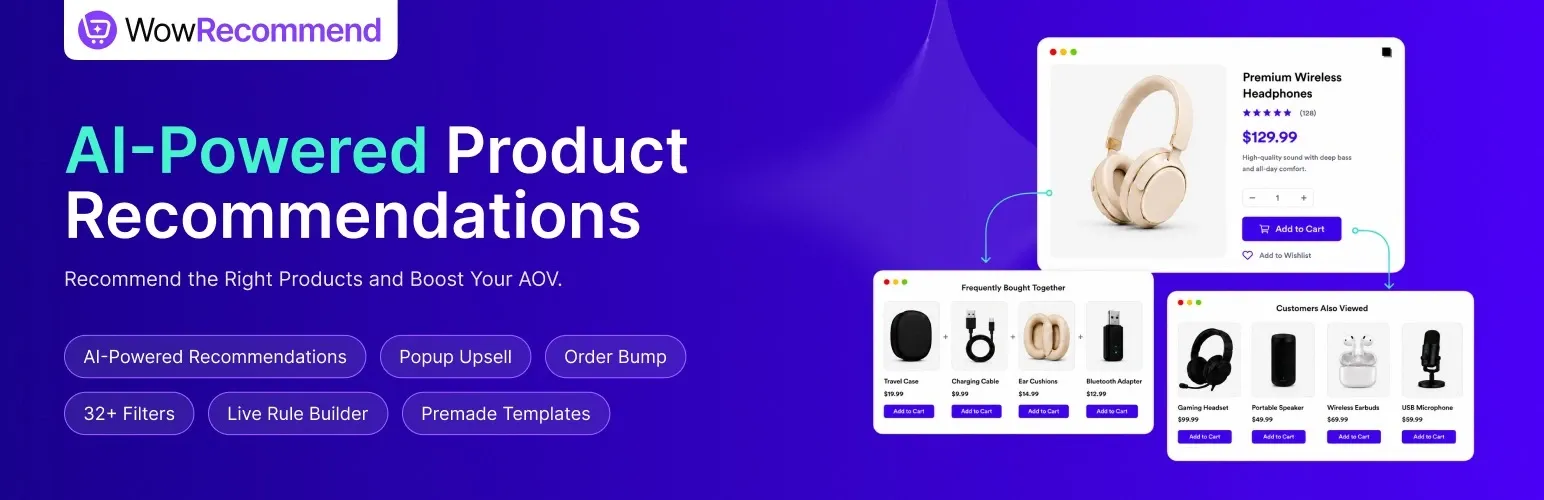
WowRecommend is an AI product recommendation plugin made for WooCommerce.
It gives store owners a Recommendation Rules Builder where they can create recommendations with AI, guided options, premade templates, or manual settings.
Recommendations can be added to several WooCommerce pages, including:
- Product Page
- Shop Page
- Product Archive
- Cart
- Checkout
- Thank You Page
Each page can also have more than one placement. This means you can decide exactly where a recommendation should appear.
WowRecommend includes more than 32 recommendation filters divided into four groups:
- Product
- Sales & Performance
- Customer Behavior
- Product Relationship
These filters can be used for many recommendation ideas.
For example, you can recommend best-selling products, recently viewed products, products from a specific category, products from a selected brand, upsells, cross-sells, related products, or products often bought together.
After choosing the products, Smart Sorting controls which products appear first. You can sort by popularity, conversion, freshness, price, rating, random order, or bought-together performance.
The plugin also includes premade templates, live preview, scheduling, display conditions, Popup Upsells, Checkout Order Bumps, and analytics.
AI Product Recommendations for WooCommerce
AI Product Recommendations for WooCommerce is a WooCommerce Marketplace extension by Azent Labs. It uses OpenAI to generate product recommendations and personalized shopping suggestions based on store data and customer activity.
It also includes separate features for upselling, cross-selling, and an AI shopping assistant that can answer product questions.
Recommendations can appear on the Shop page, Product pages, Cart, and Checkout, while shortcodes can be used for custom locations. Store owners can configure recommendation counts, result filtering, relevance settings, upsell and cross-sell strategies, triggers, and display options.
The plugin also includes built-in performance and conversion analytics.
Smart Related Products – AI-Inspired Recommendations for WooCommerce
Smart Related Products is a WooCommerce recommendation plugin by Shark Themes. It focuses on showing related products based on customer activity instead of relying only on WooCommerce’s default random related products.
The plugin can use products customers have viewed, products in their cart, and their purchase history to find relevant suggestions.
The plugin can automatically match the store theme, making basic product recommendations easier to display without extra styling.
Its main focus is behavior-based related products. The official pages do not list a merchant AI chat rule builder, dedicated Popup Upsells, Checkout Order Bumps, or recommendation sales analytics.
Setting Up Product Recommendations With the Help of AI: Step-by-Step
WowRecommend gives you more than one way to create recommendations. You can use AI Chat, Guided Steps, premade templates, or create everything manually.
Here is a simple AI-based setup process:
Step 1: Install and Activate the Recommendation Plugin
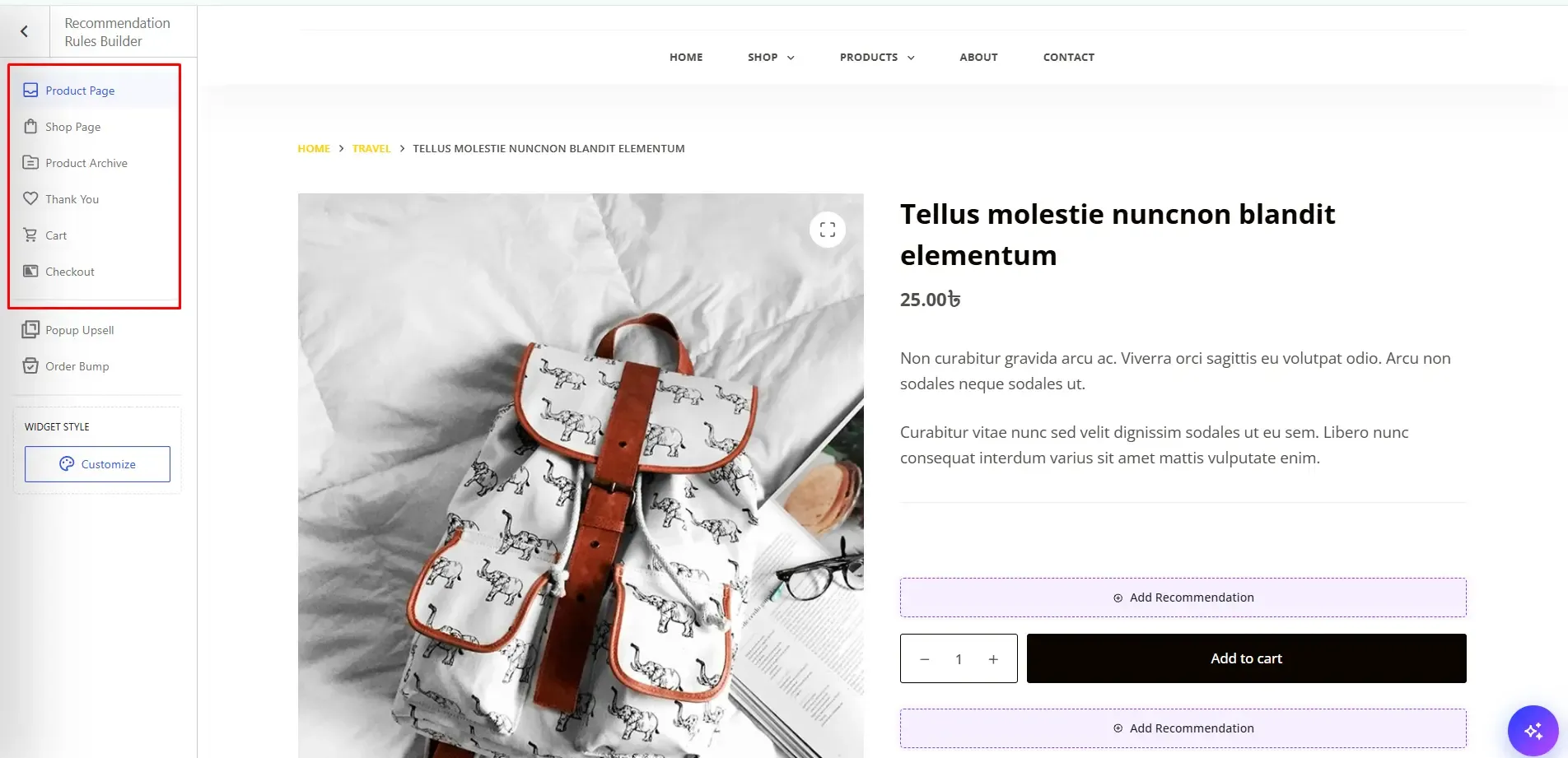
Install and activate WowRecommend on your WooCommerce website.
After activation, open the Recommendation Rules Builder. This is the main area where recommendations are created and managed.
The left side shows the available target pages. The right side shows a live preview of the selected page. You can also see the available recommendation positions directly inside the preview.
Step 2: Connect an AI Provider
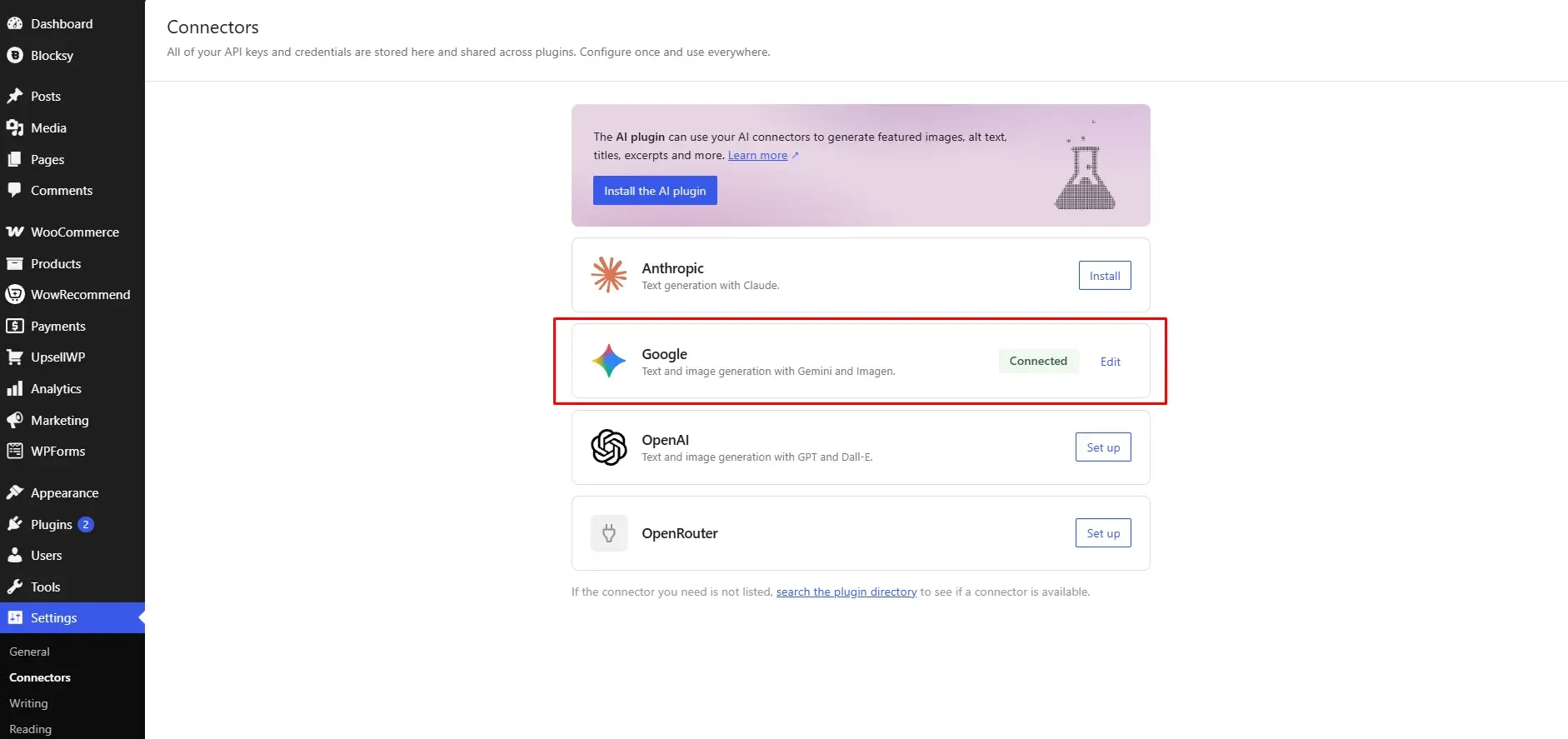
WowRecommend does not have its own separate API key field. It works with the AI Client and Connectors system available in WordPress 7.0.
AI providers are connected from:
WordPress Dashboard → Settings → Connectors
Once an AI provider is connected there, WowRecommend can use that connection for its AI Chat.
If no AI provider is connected, you can still use the Guided Steps. Only the natural-language AI Chat requires an active AI connection.
Step 3: Use WowRecommend to Build the Recommendation Rule
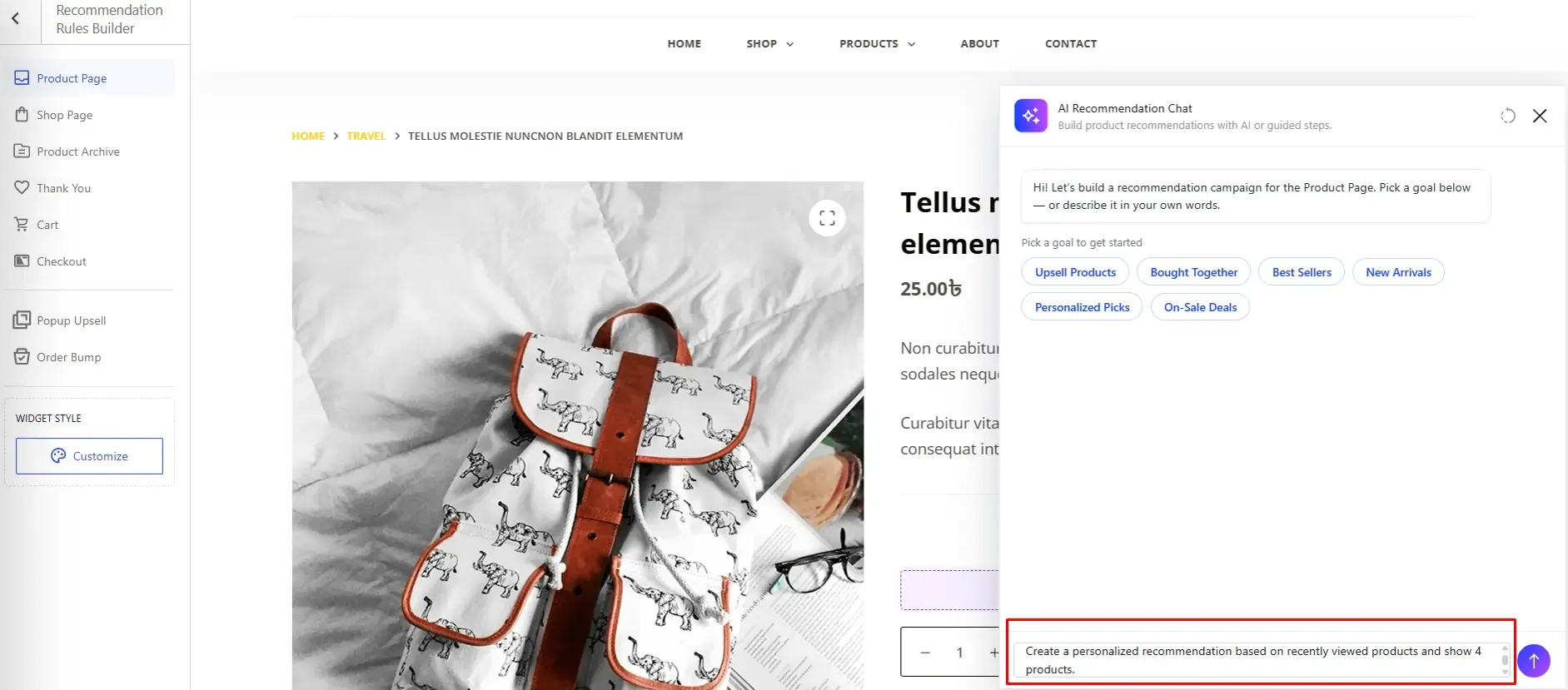
Select the page where you want to create the recommendation. Then open AI Recommendation Chat from the bottom-right corner.
You can start with Guided Steps. The available suggestions change depending on the selected page. For example, the Product Page may show options such as:
- Upsell Products
- Bought Together
- Best Sellers
- New Arrivals
- Personalized Picks
- On-Sale Deals
If AI is connected, you can also type your own request.
For example:
Create a personalized recommendation based on recently viewed products and show 4 products.
You can then continue the conversation:
Keep the same products, but sort them by rating.
Once the setup looks right, choose a placement and apply the recommendation.
Step 4: Customize Filters, Sorting, and Recommendation Placement
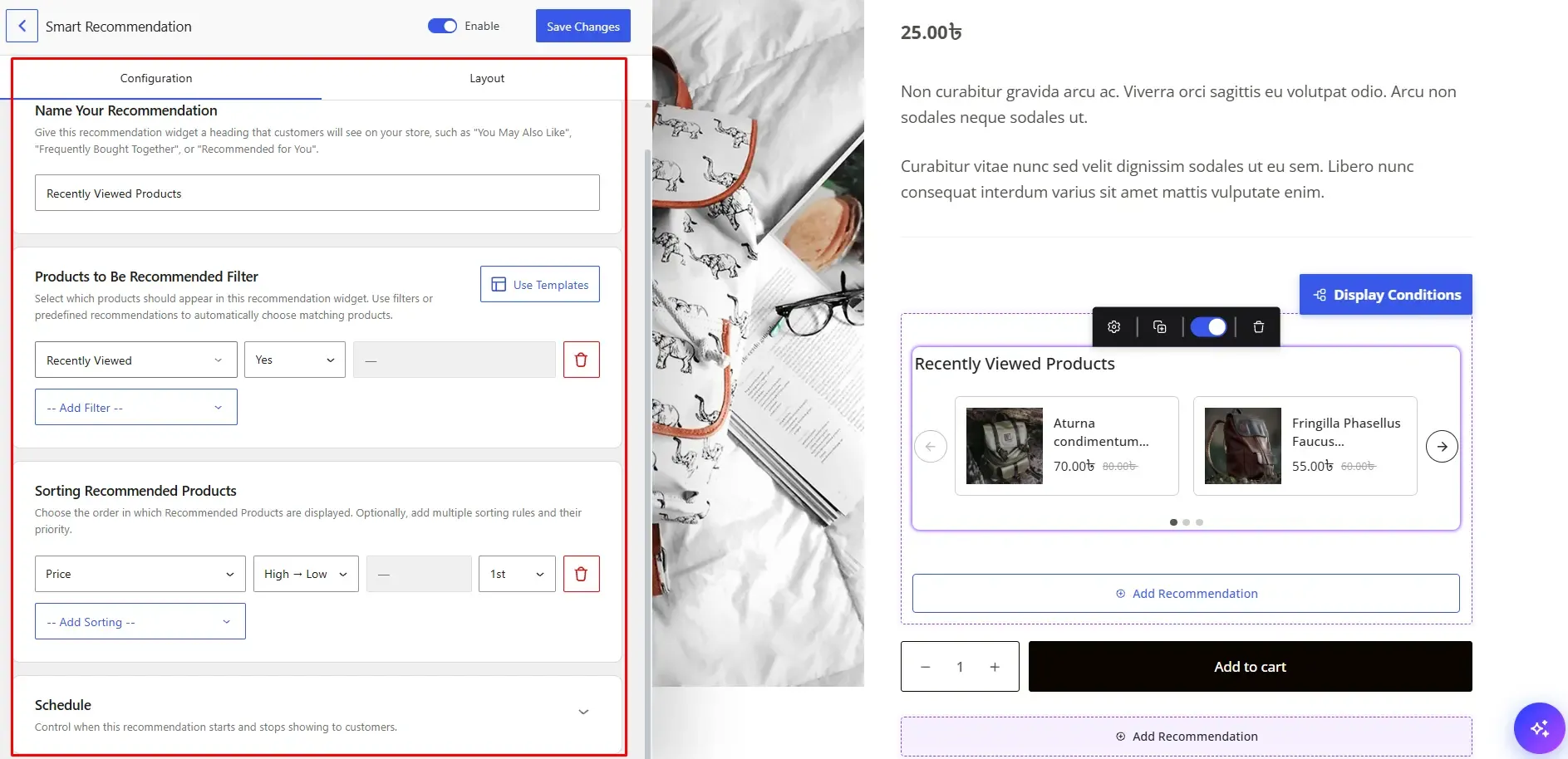
AI-created recommendations can still be edited manually. You can change the filters, sorting, placement, product count, schedule, and other settings.
Filters decide which products can appear. For example, you can create a rule that shows best sellers but removes out-of-stock products.
Sorting controls the order of the products that match those filters. For example, you can show the highest-rated matching products first.
You can also add more than one sorting rule and use priorities. If two products have the same result under the first sorting rule, the next priority works as a tie-breaker.
WowRecommend also includes optional Display Conditions. These are useful when multiple recommendations use the same placement. You can show them together or display them one after another.
Step 5: Select the Styling of Your Recommendations
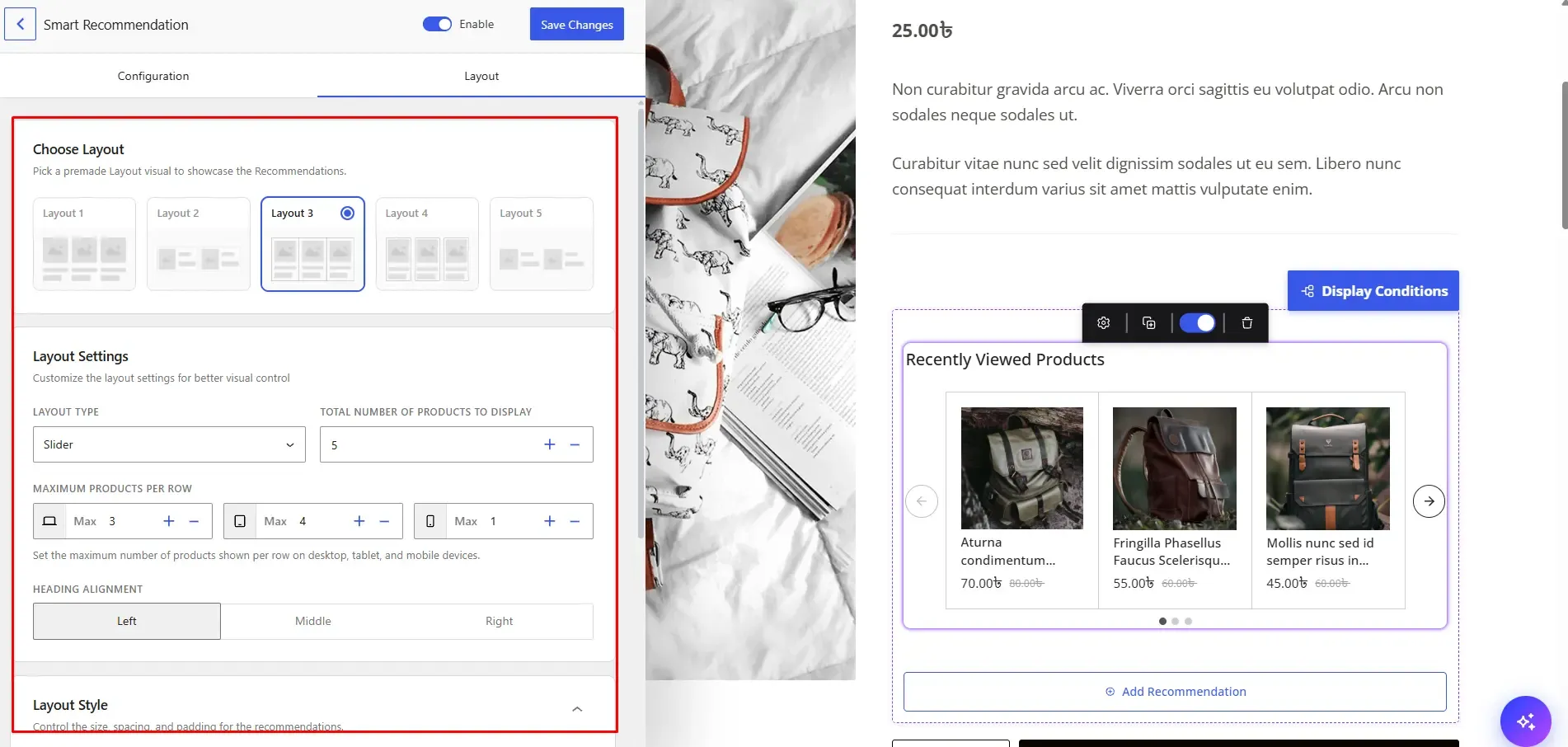
The Layout section controls how the recommendation looks. You can choose a premade layout and select either Grid or Slider.
You can also control:
- Total number of products
- Products per row
- Desktop layout
- Tablet layout
- Mobile layout
- Heading alignment
- Content size
- Borders
You can also choose which product details should appear:
- Product image
- Category
- Product title
- Rating
- Price
- Add to Cart button
The live preview shows your changes while you work.
WowRecommend also includes Popup Upsells and Checkout Order Bumps. Popup Upsells can appear after actions such as adding a product to cart, clicking a button, or staying on a page for a set amount of time. Order Bumps can show recommended products directly on checkout and can also include an optional percentage or fixed discount.
Can You Show Personalized Recommendations Based on Customer Behavior?
Yes. Customer behavior can make product recommendations much more personal and relevant.
WowRecommend includes 9 Customer Behavior Filters:
- Products Viewed
- Recently Viewed
- Frequently Viewed
- Added to Cart
- Removed from Cart
- Previously Purchased
- Customer Interest Categories
- Customer Interest Tags
- Customer Interest Attributes
These filters allow recommendations to change based on what customers have already done in the store.
For example, you could show products a customer recently viewed, recommend products from categories they often browse, or recommend products with similar attributes to products they previously purchased.
These behavior filters can be combined with other filters. For example, you could recommend recently viewed products but only show items that are currently in stock. This gives you personalization while still keeping the rules under your control.
Summing Up
AI product recommendations can make it easier for WooCommerce stores to show useful products at the right time. But a good recommendation system needs more than AI.
Store owners also need control over product filters, sorting, placement, design, timing, and performance.
WowRecommend combines these features in one recommendation system. It includes an AI Rule Builder, Guided Steps, 32+ filters, Smart Sorting, flexible placements, premade templates, live preview, scheduling, display conditions, Popup Upsells, Checkout Order Bumps, and recommendation analytics.
You can use AI to create a recommendation quickly and then edit every part manually — or you can skip AI and create the complete recommendation yourself. This makes it possible to use AI for speed without giving up control over how recommendations work in your WooCommerce store.
Frequently Asked Questions
What is an AI product recommendation?
An AI product recommendation suggests products based on what shoppers may be interested in. It can use product details, customer activity, sales data, and product relationships. This helps stores show more relevant products instead of the same suggestions to everyone.
Why should I use product recommendations?
Product recommendations help customers discover useful products while they shop. They can support upselling, cross-selling, and better product discovery. This can create more chances to increase sales and average order value.
Can recommendations use customer behavior?
Yes. Recommendations can use browsing history, cart activity, previous purchases, and customer interests. These signals help the system understand what a shopper may want next. This makes product suggestions more relevant to each customer.
Can I create recommendations without AI?
Yes. You can create recommendations with Guided Steps, premade templates, or manual rules. You do not need AI for these methods. AI Chat is an extra option that can make the setup process faster and easier.
Where can recommendations appear?
Recommendations can appear on Product Pages, Shop Page, Product Archives, Cart, Checkout, and Thank You pages. You can also use Popup Upsells and Checkout Order Bumps. This gives you different places to recommend products during the shopping journey.
Can I control which products are recommended?
Yes. You can use filters to decide which products are allowed to appear. You can also use sorting rules to control which matching products appear first. This gives you more control over every recommendation.
Can I track recommendation performance?
Yes. Analytics can show sales, orders, conversion rate, add-to-cart activity, and placement performance. You can compare how different recommendations are performing. This helps you understand which recommendation strategies work best.
Written by
MD Zannatun Nime
August 23, 2026
MD Zannatun Nime writes about WordPress, developer tools, and web design in a simple and easy-to-follow way. He enjoys making complex topics clear, practical, and useful for everyday readers.
Related reading

WOOCOMMERCE
WPSubscription V2.0 Review: WooCommerce Subscription Plans Management
A hands-on review of WPSubscription 2.0. Explore centralized subscription plans, real-time metrics dashboards, retention offers, and practical use cases for WooCommerce stores.

WOOCOMMERCE
7 Essential WooCommerce Tools for Personalized Products
WooCommerce tools for custom products help you manage personalization, pricing, SEO, checkout, shipping, and repeat sales through one coordinated store workflow.
WOOCOMMERCE
How to Export WooCommerce Products as an XML or CSV Feed [2026]
Learn how to export WooCommerce products as CSV or XML step by step. Plus, find out when you need a product feed to sell across 200+ marketplaces like Google Shopping, Facebook, and TikTok.